Heroes and Heroines,
Your feedback from the last beta not only helped us shape the Blood Weaver much closer to your vision of this class, but also allowed us to adjust how the beta runs. Thank you so much for all your valuable feedback and discussions!
Since a massive amount of information came together, we published a dedicated article showcasing the Blood Weaver along with all its balance tweaks and adjustments.
To give you a quick overview right away, here are the most important details at a glance, followed by a summary of all changes. Further down in this post, we’ll dive deeper into all the specifics.
Summary
What Has Changed
-
You can now start from Level 1
-
We reworked the stat balance of all presets
Key Beta Details at a Glance
-
You need an S&F Account to join the beta. No beta key is required.
-
September 30, 2026, 12:00 PM – October 7, 2026, 12:00 PM CEST
-
Browser access only: https://beta.sfgame.net/
-
Join our Beta Discord for discussions and feedback: https://discord.com/invite/9PvTWBytA4
-
An in-game survey will go live towards the end of the beta. We’ll share the questions beforehand on our Beta Discord server
More Information
How do I pick presets and create multiple characters?
-
Open the beta server in your browser: https://beta.sfgame.net/
-
After confirming the Blood Weaver, customize your looks and choose your name. The beta server is selected automatically as the game world.
-
The game will then launch, displaying an info screen with preset choices. Pick your desired preset and kick off your playtest adventure.
-
You can choose between different presets or start at Level 1, creating multiple presets / characters as you wish.
-
Presets:
-
-
-
-
Character Level LV 300
-
Character Level LV 400
-
Character Level LV 500
-
Character Level LV 600
-
-
Preset stats have been revamped based on averages to make characters feel more "naturally leveled."
-
-
You can create another character as usual via the plus icon on the character select screen. The following steps match the creation of your first character.
How do I find dummy characters in the Hall of Fame?
-
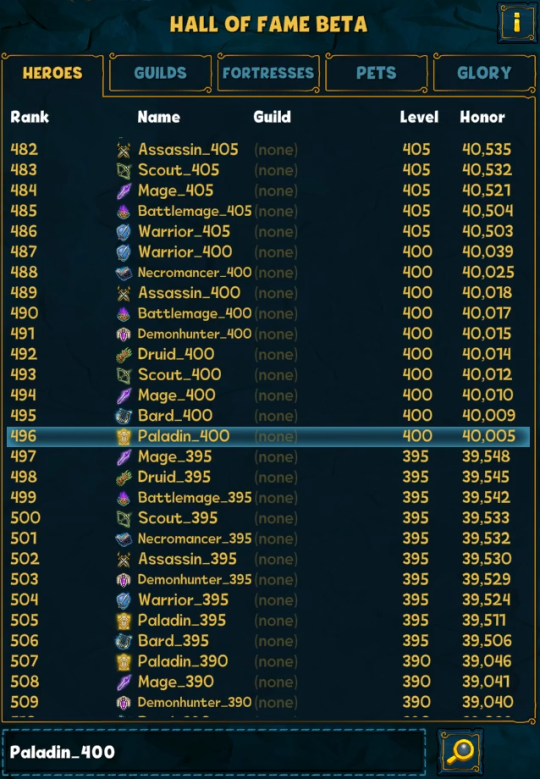
In the Hall of Fame, you will find dummy characters for every class. The Levels start at 5 and increase in increments of five. The maximum Level varies depending on the class.
-
Enter the Hall of Fame and type the appropriate name into the search bar to challenge the dummies directly.
-
All names follow this pattern: [EnglishClassName]_[Level]. Please make sure to enter the name of the desired class in English. Here are a few examples:
-
Looking for a Plague Doctor at Level 50 → Plaguedoctor_50
-
Looking for a Demon Hunter at Level 300 → Demonhunter_300
-
Looking for a Warrior at Level 600 → Warrior_600
-
Miscellaneous
-
Every character gets a fixed starting amount of mushrooms and other resources. The Mushroom Dealer is unavailable.
-
Beta characters are not permanent and cannot be used after the beta ends, making room for the next beta round.
-
All Witch enchantments are unlocked.
-
All dungeon keys are unlocked. No dungeons are cleared yet; some dungeons must be cleared first to gain access to higher dungeons.
-
The Arena Manager is unlocked.
-
The Fortress is unlocked.
-
The Underworld is unlocked.
-
Pets are unlocked and maxed out (all pets at Level 200).
-
All habitats are completed.
-
The Scrapbook is full.
-
The Guild Portal is not unlocked.
If you have questions about the beta or want to share feedback, we’d love to see you over on our Beta Discord.
Have fun with the new class!
Your Shakes & Fidget Team