
Welcome back, heroes and heroines,
We’re happy to see you returning to Shakes & Fidget!
Some things may have changed since your last session. We put together a guide to help you activate your character(s) again. Please note that to be able to get your access back, you’ll need either your S&F Account email or your character’s name and game world.
If you still have trouble, please contact our support.
Technical Issues
Technical issues, such as the inability to log in to your old character(s), may result from the introduction of the S&F Account (May 2023) or server fusions.
Login Issues and S&F Account
S&F Accounts, introduced in May 2023, link your character(s) to an email address. With that, you gain access to all linked characters from any device with one login.
-
I don’t have an S&F Account, but I do remember my character's name, the game world, and my password
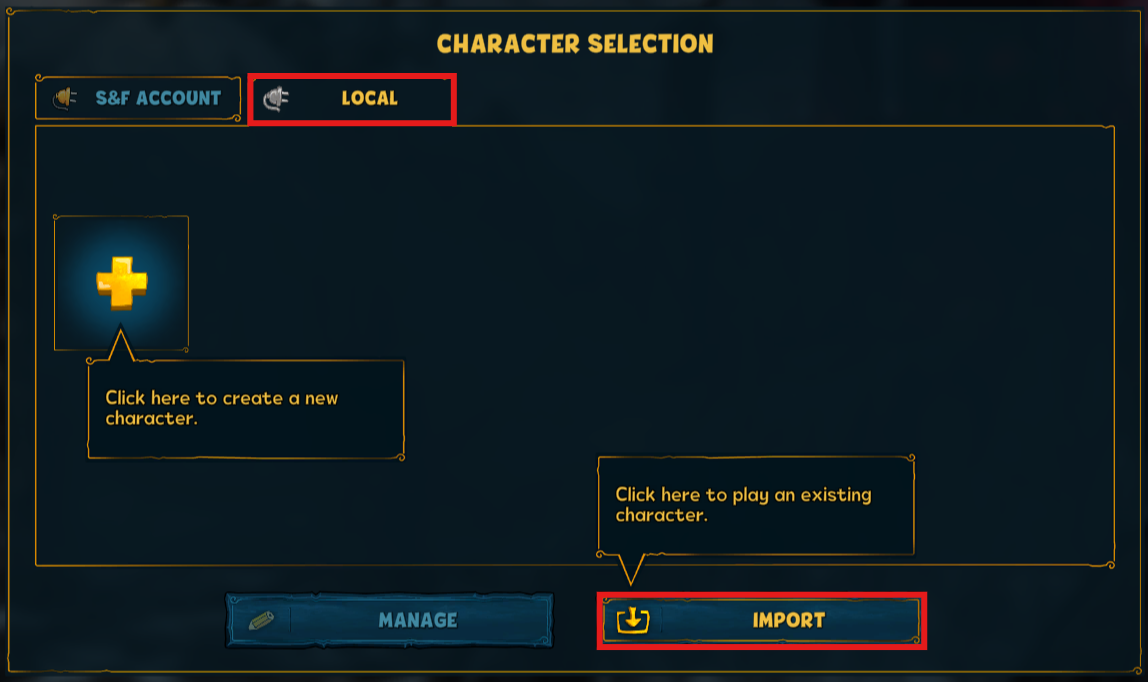
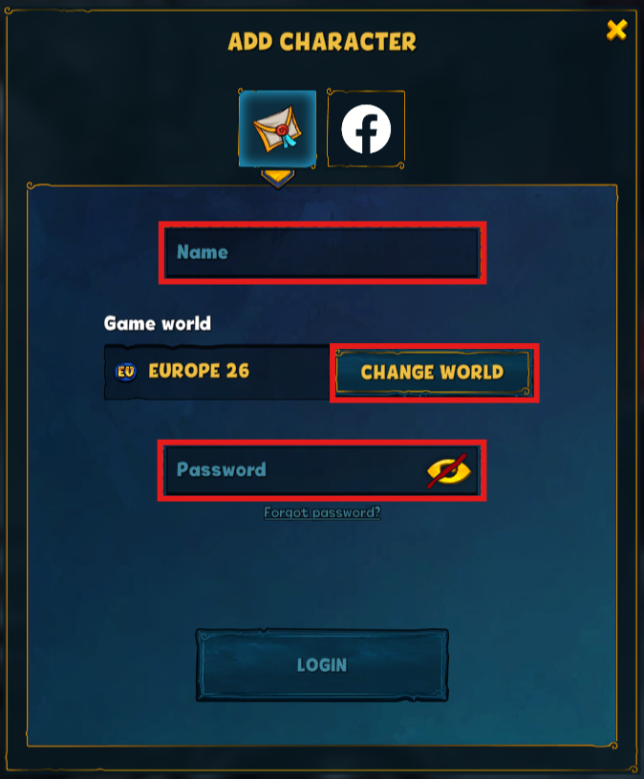
Perfect, in that case, you can easily get access to your old character via “import.” Open the character selection: open tab “local” > import > insert character name, game world, and your password.
-
I played on Steam, but didn’t have an S&F Account
The character will be linked to your Steam Account you used back then. You can simply start the game and see your character as a local character. Just create or log in to an S&F Account . You then will be asked to link the character.
-
I don’t know if I have an S&F Account or the right email address
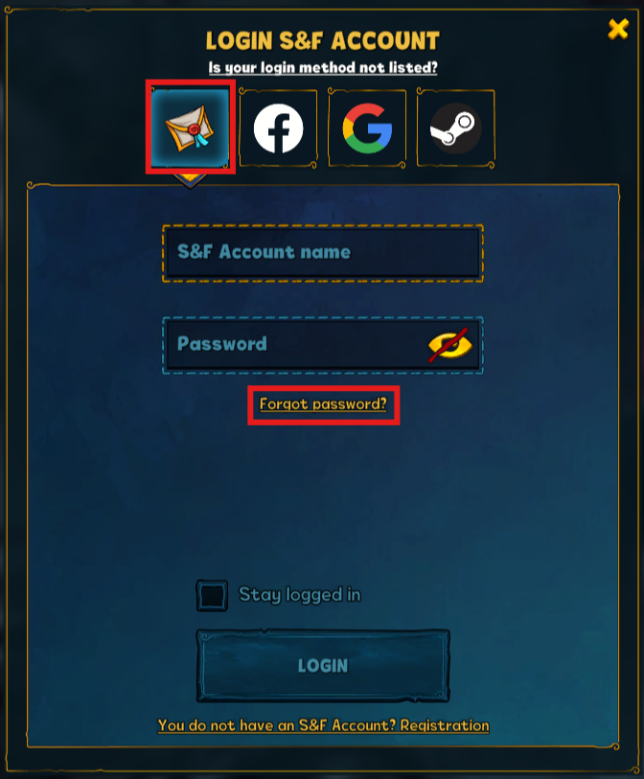
Do you have an email address most likely to be used for an S&F account? You could check if it’s a registered email address via “forgot password”.
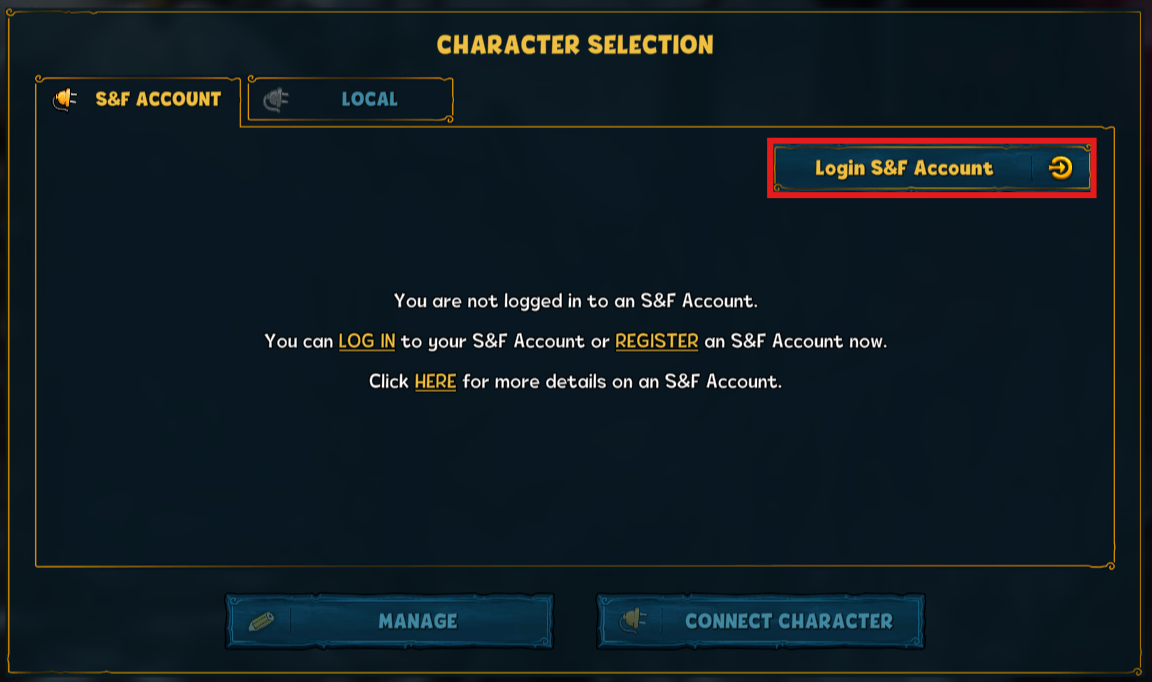
Open the character selection: open tab “S&F Account” > login S&F Account > forgot password > insert your email address. If your email is registered, you will receive a message within 30 minutes. Reset your password to get access to all linked characters.
It’s not possible to activate your account without the correct email.
-
I forgot my S&F account password, but I remember my email address
In that case, it’s not complicated to get your character(s) back. Open the character selection: open tab “S&F Account” > login S&F Account > forgot password > insert your email address. You’ll receive a message within 30 minutes. Reset your password to get access to all linked characters.
It’s not possible to activate your account without the correct email.
-
I forgot my character’s game world, but I do remember the character’s name
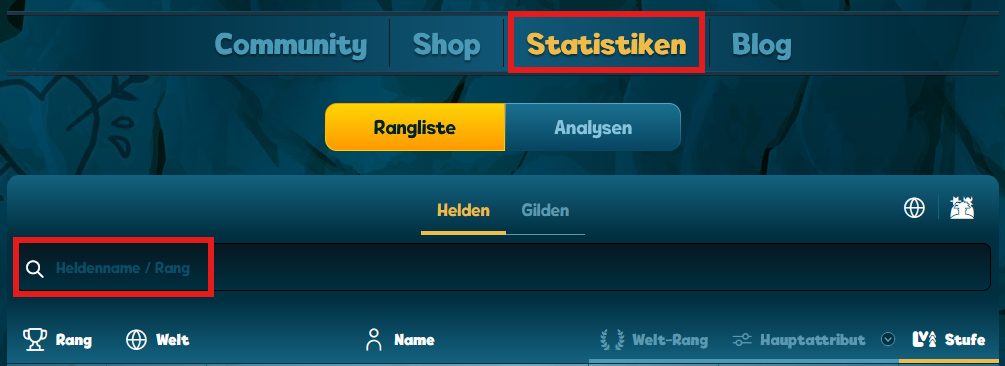
To check your character’s game world, visit our statistics page. Enter your character’s name (case-sensitive) to see all names containing it and their matching game worlds. Depending on your character’s name, there might be several characters. Nevertheless, it can still be helpful when looking for your game world or when talking to our Customer Support to identify your old characters.
If you truly remember your character name, but you can’t find it in our statistics page, and you never made a purchase in Shakes & Fidget and weren’t that high of a level, it can be that your character got removed in our fusions to make space for more active characters. Unfortunately, we can’t keep every character in perpetuity. We are trying to keep as many characters alive as possible, but at some point, the databases get too big, and we have to delete the lowest characters without payments, who didn’t login first. (Usually, these deleted characters are below level 100 and haven’t logged in for years.)
-
I forgot my password and don’t have an S&F Account, but I do remember the character’s name and game world, and I still have access to the email account!
Reset your password, and you’ll be able to play with your character again. Go to character selection > tab “local” > import > insert character name and game world > forgot password
It’s not possible to get your character back without its name and game world.
Fusion
Every now and then, we merge several game worlds into one new world. If your old server was part of a fusion, you might have problems logging in.
-
I can’t find my game world, but I know my login information
Please check our Helpshift article if your former game world was part of a fusion. If your character is linked to an S&F Account, you’ll automatically be playing on the new world after you log in. Without an S&F Account, go to the character selection: open the tab “local” > import > insert character name, game world, and your password.
-
I can’t log in to the new merged server, but I’m sure that I'm using the right login information
Whenever we carry out a server fusion, the system detects inactive accounts. If you haven’t been active for quite a while, your character might have been deleted during a fusion.
If you’re still having trouble getting access to your old character(s), but have the correct mail address or character name and game world, feel free to contact our support. We’re happy to help you!


